![GU_Logo_Secondary_Color-3.png]](https://support.goodunited.io/hs-fs/hubfs/GU_Logo_Secondary_Color-3.png?height=40&name=GU_Logo_Secondary_Color-3.png)
What:
- Adds an option to pause Journeys and delete templates directly from the Journey card menu.
- Applies to both My Journeys and Journey Library pages.
Why:
- Simplified Management: Enables users to remove unused or outdated Journeys and templates effortlessly.
- Cleaner Interface: Helps nonprofits and users maintain an organized workspace by decluttering their Journey lists.
How:
Front-End Functionality:- Navigate to the desired Journey or template.
- Click the three dots (...) menu on the Journey card.
- Select the Pause option.
- A new Pause tab is visible and contains all the paused journeys
- Note: Nonprofits can delete templates, but this action will not erase the template from the GoodUnited profile. It will remove the access for that NP to the template.
- Journeys Library:
- Any Journey: The Pause option is available from the three-dot menu.
-1.png?width=515&height=367&name=image%20(7)-1.png)
- System Template not installed: The Delete option is available from the three-dot menu.
-1.png?width=515&height=309&name=image%20(8)-1.png)
- System Template installed and in Draft mode: Super Admin users can delete it via the three-dot menu.
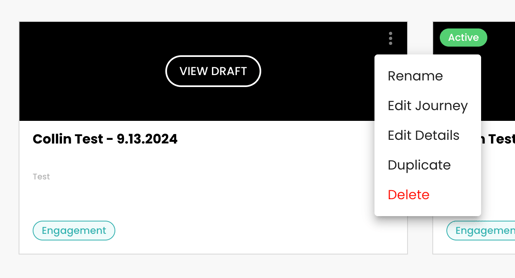
- Any Journey: The Pause option is available from the three-dot menu.
- My Journeys:
- Any Journey: The Pause option is available from the three-dot menu.
-2.png?width=534&height=128&name=image%20(7)-2.png)
- Confirmation is provided when a Journey has been paused.
-1.png?width=517&height=197&name=image%20(9)-1.png)
- Any Journey: The Pause option is available from the three-dot menu.
- Paused Journeys:
- Paused Journeys are visible under a Paused tab with clear state indications.
-2.png?width=622&height=93&name=image%20(8)-2.png)
- Resuming a paused Journey is possible via the Journey Editor.
-2.png?width=617&height=133&name=image%20(10)-2.png)
- Paused Journeys are visible under a Paused tab with clear state indications.
For Super admin users:
- System template can still be deleted if the template is in Draft mode. If it is published, you can Pause it to remove it from the main template listing.
- If a template is not installed, when paused, it will remove access to all NPs.
Use cases:
- Decluttering the Active Tab
- A nonprofit has multiple inactive or outdated Journeys in the Active tab, making it harder to focus on current Journeys.
- Benefit: Pausing unused Journeys reduces noise, allowing users to easily manage and prioritize active campaigns.
- Seasonal Campaigns
- A nonprofit runs seasonal or time-sensitive campaigns (e.g., year-end fundraising, Giving Tuesday, Memorial Day). Once the campaign concludes, they can pause the journey to stop triggering messages.
- Benefit: Ensures supporters do not receive outdated or irrelevant communications while preserving metrics for analysis.
- Adjusting to Organizational Changes
- A nonprofit shifts priorities, launches a new initiative, or pauses specific campaigns temporarily due to internal resource constraints.
- Benefit: Enables organizations to pause journeys without permanently deleting them, allowing for quick reactivation later.
- Avoiding Conflicting Communications
- Use Case: Two journeys might overlap for a specific supporter group, risking conflicting or duplicate messaging. Pausing one journey can prevent confusion.
- Benefit: Helps manage messaging frequency and ensures communication remains clear and relevant.
- Performance Analysis
- A nonprofit wants to evaluate the performance of a journey over a set period. Pausing it allows for a clear-cut analysis window.
- Benefit: Allows teams to assess metrics without additional supporters being added during evaluation.
FAQs:
- What happens when I pause a Journey?
- Can I resume a paused Journey?
- Will pausing a journey affect its associated Acquire tools?
- Are there any restrictions on pausing a Journey?
- Does pausing a Journey affect its metrics?
- What happens to supporters currently in a paused Journey?
- Can I pause a Journey that is currently active and has supporters moving through it?
- How do I distinguish paused Journeys from active or draft Journeys?
- Can I edit a paused Journey?
- What happens if I pause a Journey that’s part of an automation (e.g., connected to other Journeys or conditions)?