![GU_Logo_Secondary_Color-3.png]](https://support.goodunited.io/hs-fs/hubfs/GU_Logo_Secondary_Color-3.png?height=40&name=GU_Logo_Secondary_Color-3.png)
What’s New:
- The Default Reply message now displays in an editable text field (previously hidden) in the UI.
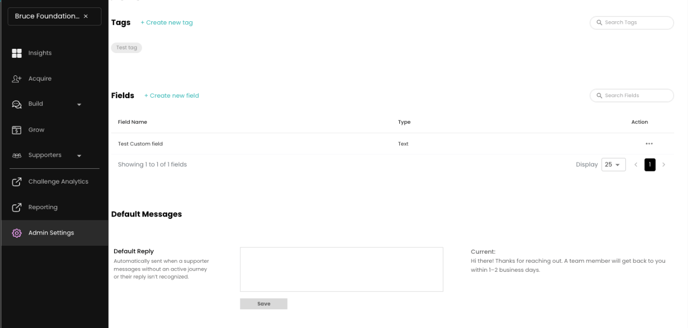
- The Default Reply will now be triggered in two primary scenarios:
- When a supporter messages the nonprofit and there is no journey waiting.
- When a supporter responds with unexpected input (e.g., text instead of tapping a button).
- The system will send the default reply first and then send the node up to 2 times.
- Admins can update the default message copy, and saved changes will overwrite the existing default.
- The default reply will be sent at most once every 24 hours per supporter.
- Added feature: The system will recognize button-copy text typed manually and route properly, only if written exactly the same as the button, with Caps if needed.
Why It Matters
- Supporters often send free-text replies or messages outside of designed journeys, leading to confusion or silence when the system doesn't recognize their intent. This behavior is especially common when buttons are not used as expected. By enabling a controlled, consistent Default Reply, nonprofits can reassure supporters that they will receive a response — without breaking the automation logic.
- The addition of UI visibility and editability empowers teams to manage messaging tone and content, while the 24-hour throttle prevents message fatigue. These changes support more resilient, flexible supporter conversations at scale, especially as volume increases in response to broader campaign growth.
Known Limitations
- Same message when a supporter writes directly and there is no journey set up to respond and also for wrong inputs.
- UI shows the default reply field as editable but requires saving to apply changes.
- If a person receives the default reply before entering a Journey, and then enters a Journey and indicates a wrong format, they will receive the Default reply. 24 hour rule only applies in the journey.
- Added feature: Only recognize if the supporter writes the exact same text, using caps if needed. The step function is not capable of recognizing if it is not the exact same response.
- Remove Current Default Reply preview, and show it in the text box to easily review and edit it.
Test Cases – Default Reply & Editable UI
- Editable Default Reply
- Edit the message in the default reply field.
- Save the update.
- Confirm that future default replies use the updated message.
- Trigger Case 1 – No Journey
- Message the Bruce foundation stage nonprofit from a supporter profile with no active or queued journey
- Receive the Default reply
- Message again
- Confirm that the default reply is sent once.
- Trigger Case 2 – Unexpected Input
- Enter a journey where you send a message with a button-based ask.
- Respond with text, not a button.
- Confirm that the node is repeated up to 2 times.
- On the 3rd invalid response, confirm that the default reply was sent once.
- Respects 24-Hour Rule
- After receiving a default reply, send another invalid message within 24 hours.
- Confirm that no new default reply is triggered.
- Wait until the 24-hour window passes, re-trigger, and confirm that it is now sent again.
- Typed Button Copy
- Present a multiple-choice question using buttons.
- Type the exact button label as a text response.
- Confirm that the system correctly matches the typed text to the right flow.