![GU_Logo_Secondary_Color-3.png]](https://support.goodunited.io/hs-fs/hubfs/GU_Logo_Secondary_Color-3.png?height=40&name=GU_Logo_Secondary_Color-3.png)
What’s New
- Two new filters have been introduced under the Behaviors category, now available on both the Supporters Page filters and the Journey Builder (Condition Node):
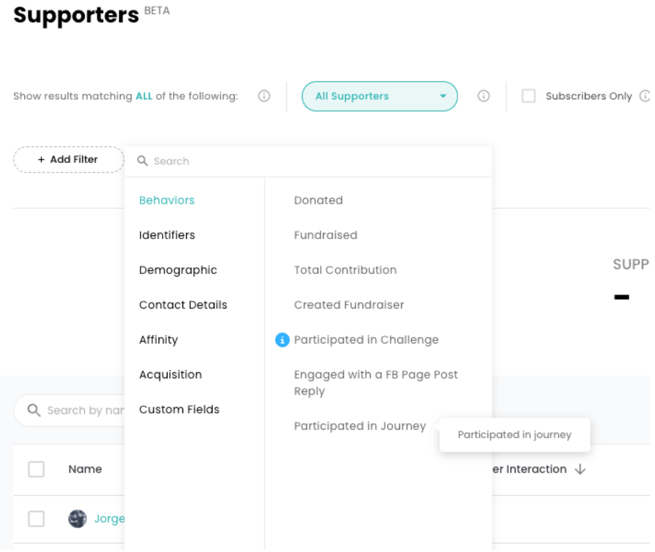
- Participated in Journey (Journey delivered)
- Replied on FB Page Tool (Journey delivered)
- These filters enable users to segment supporters more precisely based on historical engagement, supporting more personalized journey paths and targeted outreach.
- Each filter includes date-based options, property matching, and frequency logic to allow for robust query building, following the same UX patterns as existing filters.
Why It Matters
- Supporter behavior is the strongest signal for relevance. With these new filters, users can:
- Re-engage supporters who previously participated in specific journeys, segmented by frequency, category (Engagement vs Revenue), or date.
- Identify supporters who interacted with a Facebook Page post (reply-based entry points), enabling follow-up messaging or exclusions.
- These additions empower more strategic audience segmentation and smarter conditional logic in journeys—improving personalization and conversion, especially in paid campaigns and reactivation flows.
Known Limitations
- Participated in Journey
- Name matching supports only “Is” operator due to limitations in how journey names are stored (Postgres-based and not mapped to Snowflake).
- We’ve observed a 0.1% discrepancy between journey delivery metrics and the number of supporters returned by the Supporters Page filter. This is happening for specific journeys where we removed some Supporters due to missing information (No name, no acquisition source, no donations/FR).
- Replied on FB Page Tool
- Any Post (post type = “Any”) will only apply to data after the April 2025 production release.
- Name of post supports only Is and Is not. Other operators like Contains are not supported because the system does not store names, only post IDs.
- Filter values are derived from structured post metadata (date and first few characters of the post).
- Only FB page replies handled by the Acquire Tool will be recognized.
- Only people who go through the FB page reply tool will result of the filter
- This feature is not enabled to be tested in lower environments, so we will test it in production
Test Cases – Behavioral Filters
- Filter Visibility
- Open Supporters Page and Journey Builder.
- Confirm “Participated in Journey” and “Replied on FB Page Tool” appear under the “Behaviors” category.
- Basic Filtering
- Apply each filter independently with valid values.
- Confirm that the correct list of supporters is returned.
- Multi-Filter Logic
- Combine both filters to test compound logic.
- Validate the correct subset returned.
- Participated in Journey
- Journey Name – IS Operator
- Use the Is operator to filter by known journey name.
- Confirm accurate supporter match.
- Category Name
- Use “Is Engagement” and “Is Revenue”.
- Confirm results are restricted to the appropriate type of journey.
- Frequency Filter
- Test filters like Greater than 2, Is 1, Between 2 and 5.
- Validate correct count-based segmentation.
- Date Filters – Specific & Relative
- Use Between, Before, After, and On to filter by participation date.
- Confirm the accuracy of filtered results.
- Replied on FB Page Tool - Only test it in Production
- Specific Post Name Matching
- Select a known post using Is.
- Confirm that supporters who replied are correctly shown.
- Date-Based Filtering
- Use relative (e.g., "last 7 days") and specific dates to narrow results.
- Confirm only those who replied within the selected timeframes are returned.