![GU_Logo_Secondary_Color-3.png]](https://support.goodunited.io/hs-fs/hubfs/GU_Logo_Secondary_Color-3.png?height=40&name=GU_Logo_Secondary_Color-3.png)
What’s New:
- Users can now add all filtered supporters across multiple pages to a list via the “Save as” → “Save to a List” button.
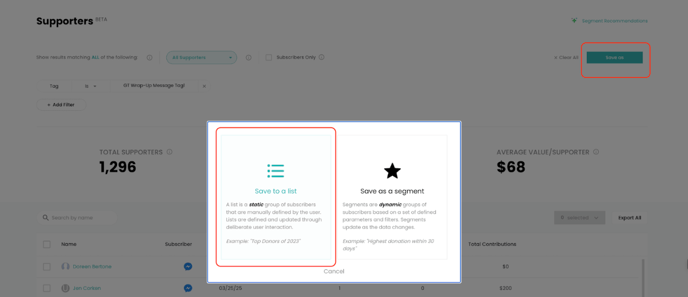
- If no individual supporters are selected, the full filtered result set is added to the list automatically.
- If some supporters are selected, the full filtered result set is still added when using "Save as."
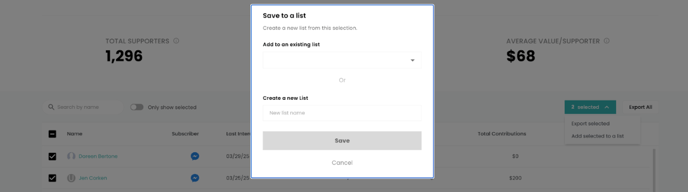
- The button next to “Export all” still allows adding only selected supporters to an existing or new list.

- Users can create list by selecting one person and using the “Add selected to a list”.
Why It Matters
- Previously, users were limited to selecting 50 supporters per page, forcing them to manually page through large filtered datasets to build complete lists. This was particularly painful for professional services and customer success teams managing multi-step donor journeys or audience creation.
- Previously, users were limited to selecting 50 supporters per page, forcing them to manually page through large filtered datasets to build complete lists. This was particularly painful for professional services and customer success teams managing multi-step donor journeys or audience creation.
Known Limitations
- Frontend will still show 50 results per page — there is no "Select All" or “Unselect All” checkbox that dynamically changes state.
- Frontend will still show 50 results per page — there is no "Select All" or “Unselect All” checkbox that dynamically changes state.
- Frontend will still show 50 results per page — there is no "Select All" or “Unselect All” checkbox that dynamically changes state.
Test Cases
- Add All Filtered Supporters (No Selection)
-
- Apply a filter returning >50 supporters.
- Do not select any individual supporter.
- Click “Save as” → “Save to a List”.
- Confirm that all filtered supporters are added to the new list.
- Validate list contains correct supporter count and data.
- Large Dataset Processing
-
- Apply a filter returning 50K+ supporters.
- Use “Save as” → “Save to a List”.
- Confirm processing time remains under 2 minutes.
- Validate that the full supporter count is accurately added.